Impossible to see Nrf9160 DK on ChromeOs - Linux Debian

Hello,

I have a debian installed on my Chrome OS. Everything seems to be ok on Programmer (launched from Nrf Connect for Desktop):

17:41:45.965
Using nrf-device-lib-js version: 0.4.13
17:41:45.966
Using nrf-device-lib version: 0.12.8
17:41:45.967
Using nrfjprog DLL version: 10.16.0
17:41:45.967
Using JLink version: JLink_V7.66a

When I try to select my device, I don't see it listed even though it's turned on.

What could be the cause ? 

Thanks !

Parents
  • Hi, 

    Have you tried the latest JLink drivers from the segger website?

    Check first your board's connection to the PC. You could check if the board appears as connected to the COM port using something like Device Manager in Windows 10. Additionally, verify that the board is listed in the output of the command "nrfjprog --com". 

    Regards,
    Amanda

  • Hello,

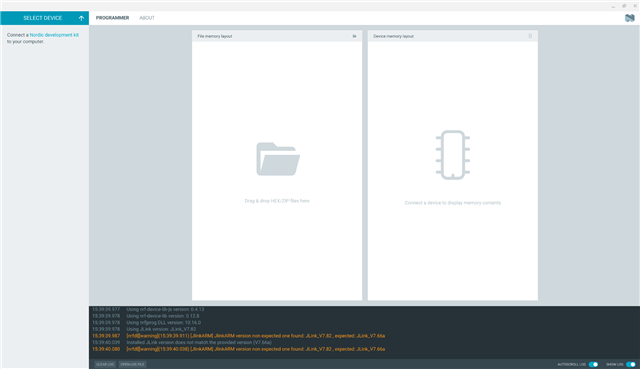
    I have installed the latest one (7.82) and now have those with "verbose logging" enabled :

    15:36:45.868
    Using nrf-device-lib-js version: 0.4.13
    15:36:45.868
    Using nrf-device-lib version: 0.12.8
    15:36:45.869
    Using nrfjprog DLL version: 10.16.0
    15:36:45.869
    Using JLink version: JLink_V7.82
    15:36:45.884
    [nrfdl][warning](15:36:45.789) [JlinkARM] JlinkARM version non expected one found: JLink_V7.82 , expected: JLink_V7.66a
    15:36:46.009
    Installed JLink version does not match the provided version (V7.66a)
    15:36:46.009
    [nrfdl][warning](15:36:46.008) [JlinkARM] JlinkARM version non expected one found: JLink_V7.82 , expected: JLink_V7.66a

    You could check if the board appears as connected to the COM port using something like Device Manager in Windows 10

    The card is working correctly on a Windows 10 computer, it's on my Chrome OS with Linux developper mode that it is not shown. It appears in device management though. 

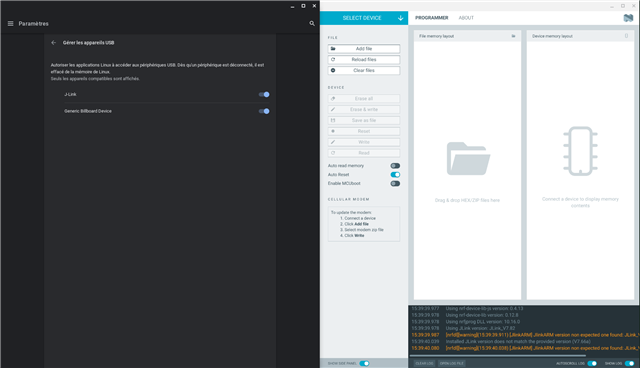
    Traduction of the french window on the left: 

    "Manage USB devices

    Authorize Linux applications to access to USB deveices. Once a device is disconnected, it is removed from Linux's memory. Only compatible devices are shown."

    The device is not showing on "Select device" menu : 

    Thanks !

    Gillen

  • Hi, 

    Please provide the file log.log generated from running nfjprog --deviceversion --log. 

    -Amanda

  • Hi Amanda,

    I have tried the command again, but the log.log generated is empty. I tried to remove the old one and entered nrfjprog --deviceversion --log to see if a new one is generated. It is but still empty.

    I managed to find another log file, located in my_home_folder/.config/nrfconnect/pc-nrfconnect-programmer/logs/2022-10-24T14_23_44.710Z-log.txt

    Here is what is inside : 

    2022-10-24T14:23:45.391Z DEBUG Application data folder: /home/gillenlaxalt/.config/nrfconnect/pc-nrfconnect-programmer
    2022-10-24T14:23:45.576Z INFO Using nrf-device-lib-js version: 0.4.13
    2022-10-24T14:23:45.576Z INFO Using nrf-device-lib version: 0.12.8
    2022-10-24T14:23:45.577Z INFO Using nrfjprog DLL version: 10.16.0
    2022-10-24T14:23:45.577Z INFO Using JLink version: JLink_V7.66a
    2022-10-24T14:23:45.650Z DEBUG App pc-nrfconnect-programmer v3.0.4 official
    2022-10-24T14:23:45.650Z DEBUG App path: /home/gillenlaxalt/.nrfconnect-apps/node_modules/pc-nrfconnect-programmer
    2022-10-24T14:23:45.650Z DEBUG nRFConnect 3.12.0, required by the app is (^3.12.0)
    2022-10-24T14:23:45.650Z DEBUG nRFConnect path: /tmp/.mount_nrfconV1hEAZ/resources/app.asar
    2022-10-24T14:23:45.650Z DEBUG HomeDir: /home/gillenlaxalt
    2022-10-24T14:23:45.650Z DEBUG TmpDir: /tmp
    2022-10-24T14:23:50.405Z DEBUG Client Id: cd7f715f-61b0-49aa-838b-3e3864400813
    2022-10-24T14:23:50.572Z DEBUG Google Analytics for category pc-nrfconnect-programmer has initialized

    I hope it will help

  • Hi, 

    That's from nrf-connect for desktop, not nrfjprog unfortunately. 

    The log.log exist under the executed path. Please check again. 

    -Amanda

  • Hi,

    I checked indeed on my home path, where the nrfconnect-3.12.0-x86_64.appimage is executed from.

    log.log file exists, but never modified, and weights 0

    Thanks

  • Hi, 

    Wherever you execute --log, the log.log would be under the path where you execute. For example, if you execute nfjprog --deviceversion --log under home, you should find log.log under home. 

    -Amanda

Reply Children
Related