NRF5340DK High frequency SPIM communication failure / spi_transceive() delay problem

Hello,

I am trying to exchange data with an external slave sensor via SPIM communication using the nRF5340DK.

I am currently facing two main issues:

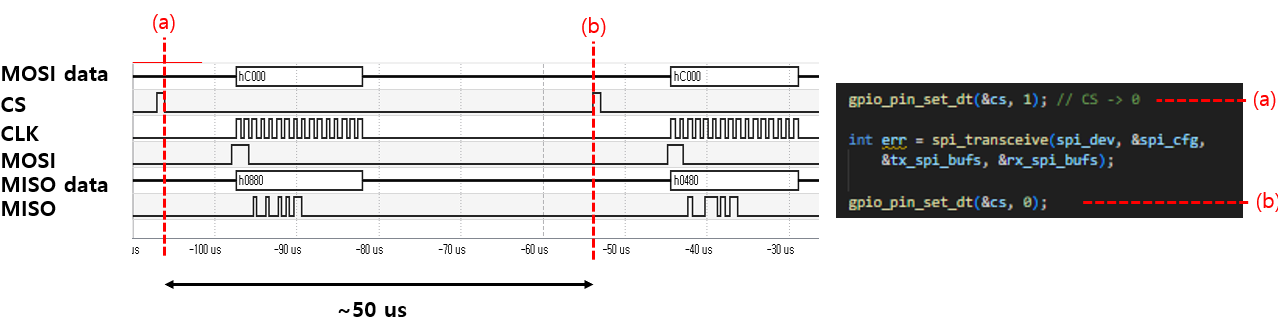
1.The spi_transceive() function takes too long to execute.

This is significantly reducing the effective data transfer rate.
I have also reviewed a Q&A from someone who pointed out a similar delay with spi_transceive().

Time gap between each spi_transceive )

However, the solution suggested in that Q&A, which involved modifying spi configuration in the main.c, doesn't seem to be applicable to the nRF5340 as it resulted in an error

To clearly explain my situation, I have attached my main.c, overlay, and configuration files. 

main.c

#include <zephyr/kernel.h>
#include <zephyr/device.h>
#include <zephyr/drivers/spi.h>
#include <zephyr/drivers/uart.h>
#include <zephyr/sys/printk.h>
#include <zephyr/drivers/gpio.h>
#include <stdio.h>

/* Get SPI device from devicetree */
#define SPI_DEVICE_NODE DT_ALIAS(spi4_basic)
static const struct device *spi_dev = DEVICE_DT_GET(SPI_DEVICE_NODE);

static const struct device *uart_for_data_tx = DEVICE_DT_GET(DT_CHOSEN(zephyr_console));

#define SW0_NODE     DT_ALIAS(sw0)
static const struct gpio_dt_spec cs = GPIO_DT_SPEC_GET(SW0_NODE, gpios);


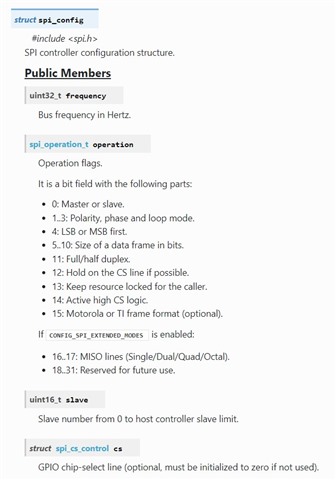
static struct spi_config spi_cfg = {
    .frequency = 1000000,           // SPI frequency.
    .operation = SPI_OP_MODE_MASTER | SPI_WORD_SET(8) | SPI_TRANSFER_MSB, // SPI Mode 0
    .slave = 0,                     // Master mode
    .cs = NULL,
    //.cs = &spi_cs,                // Manage CS pin with cs-gpios in Devicetree
};


/* RHD2000 command definitions (16-bit) */
#define RHD_CMD_CONVERT(channel) (uint16_t)((((uint16_t)(channel) & 0x3F) << 8)) 
// Input: 00RR RRRR 0000 0000 
// Output: DDDD DDDD DDDD DDDD
#define RHD_CMD_WRITE(reg, data) (uint16_t)(0x8000 | (((uint16_t)(reg) & 0x3F) << 8) | ((uint16_t)(data) & 0xFF)) 
// Input: 10RR RRRR DDDD DDDD
// Output: 1111 1111 DDDD DDDD , D: same with input's D (for confirm)
#define RHD_CMD_READ(reg)        (uint16_t)(0xC000 | (((uint16_t)(reg) & 0x3F) << 8))
// Input: 11RR RRRR 0000 0000
#define RHD_CMD_CALIBRATE        (uint16_t)(0x5500) // 0101 0101 0000 0000 
#define RHD_CMD_DUMMY_READ       RHD_CMD_READ(63) //


static int rhd_spi_transfer(uint16_t tx_command, uint8_t *rx_buffer) {
    uint8_t tx_buffer[2];

    // Convert 16-bit command to a Big-Endian byte array
    tx_buffer[0] = (uint8_t)(tx_command >> 8);  // MSB
    tx_buffer[1] = (uint8_t)(tx_command & 0xFF); // LSB

    const struct spi_buf tx_spi_buf = {
        .buf = tx_buffer,
        .len = sizeof(tx_buffer)
    };
    const struct spi_buf_set tx_spi_bufs = {
        .buffers = &tx_spi_buf,
        .count = 1
    };

    // Directly store received data in the rx_buffer passed from main
    struct spi_buf rx_spi_buf = {
        .buf = rx_buffer,
        .len = 2
    };
    const struct spi_buf_set rx_spi_bufs = {
        .buffers = &rx_spi_buf,
        .count = 1
    };

    while (1) {

        gpio_pin_set_dt(&cs, 1); // CS -> 0

        int err = spi_transceive(spi_dev, &spi_cfg,
            &tx_spi_bufs, &rx_spi_bufs); 

        gpio_pin_set_dt(&cs, 0);

        return 0;
    }
}

int main(void)
{
    int ret;
    int err;
    ret = gpio_pin_configure_dt(&cs, GPIO_OUTPUT_INACTIVE);
    gpio_pin_set_dt(&cs, 0); // I still don't understand why the output is 1 when 0 is passed to the set function.

    if (!device_is_ready(spi_dev)) {
        printk("SPI device %s is not ready!\n", spi_dev->name);
        return 0;
    }

    if (!device_is_ready(uart_for_data_tx)) {
        printk("UART device for data TX (%s) is not ready!\n", uart_for_data_tx->name);
        return 0;
    }

    printk("nRF5340 SPIM example started.\n");
    printk("Reading MISO pin (connected to DC voltage) and sending to PC via UART every second.\n");


    uint8_t rx_main_buffer[2];

    err = rhd_spi_transfer(RHD_CMD_WRITE(0, 0xDE), rx_main_buffer); // ADC configuration, disable fast settle
    if (err) return err;


    while (1) {
        /* SPI communication (transceive) - send dummy bytes via MOSI to read MISO value */
        rhd_spi_transfer(RHD_CMD_READ(0) , rx_main_buffer);
    }
    return 0;
};

app.overlay

/ {

    chosen {
        zephyr,console = &uart0;    
        zephyr,shell-uart = &uart0; 
    };

    aliases {
        spi4-basic = &spi4;
    };

};


&uart0 {
    status = "okay";             
    current-speed = <1000000>;    
};


&pinctrl {
    spi4_custom_pins: spi4_custom_pins { 
        group1 {
            psels = <NRF_PSEL(SPIM_SCK,  1, 15)>,   
                    <NRF_PSEL(SPIM_MOSI, 1, 14)>,  
                    <NRF_PSEL(SPIM_MISO, 1, 13)>;  
        };
    };


    spi4_custom_pins_sleep: spi4_custom_pins_sleep {
         group1 {
            psels = <NRF_PSEL(SPIM_SCK,  1, 15)>,
                    <NRF_PSEL(SPIM_MOSI, 1, 14)>,
                    <NRF_PSEL(SPIM_MISO, 1, 13)>;
            low-power-enable; 
        };
    };
};


&spi4 {
    compatible = "nordic,nrf-spim";
    status = "okay"; 
    pinctrl-0 = <&spi4_custom_pins>; 
    pinctrl-1 = <&spi4_custom_pins_sleep>; 
    pinctrl-names = "default", "sleep";   
    cs-gpios = <&gpio1 12 GPIO_ACTIVE_LOW>;
    //max-frequency = <560000>;
    //easydma-maxcnt-bits = <32>;
};

prj.conf

# enable console
CONFIG_CONSOLE=y
CONFIG_UART_CONSOLE=y

CONFIG_SERIAL=y
CONFIG_PRINTK=y


CONFIG_SPI=y

CONFIG_GPIO=y 

In main.c, when I configure the SPI structure, I set the frequency to 1MHz.

I have confirmed with an oscilloscope that the actual clock frequency is indeed 1MHz.

Also, I'm controlling the CS pin directly via GPIO

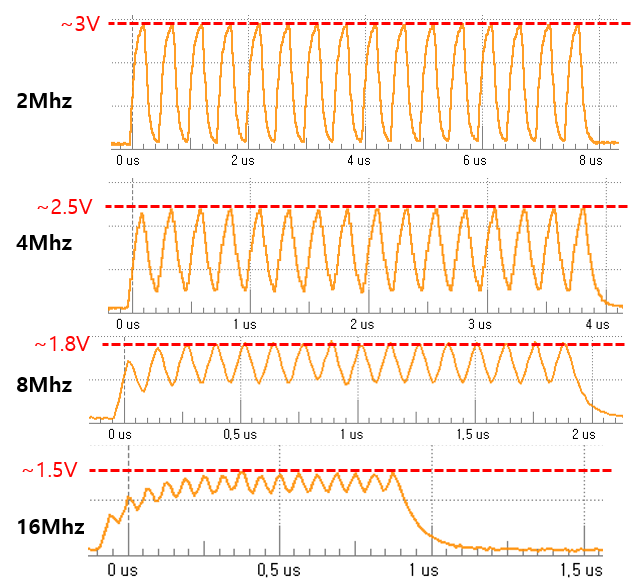
2. Although the nRF5340 specifications state that it supports SPI frequencies up to 8MHz (and even up to 32MHz for spi4),

the quality of the Clock (CLK) signal degrades significantly at frequencies higher than 4MHz.
Thank you.

Best regards, 

gwan0624

Parents
  • Have you tried letting Zephyr automatically toggle the CS pin automatically, using spi_tranceive_dt? Does that make any difference? 

    I am trying to exchange data with an external slave sensor via SPIM communication using the nRF5340DK.
    gwan0624 said:
    Although the quality has slightly decreased, it is a significant improvement compared to before the code was added.

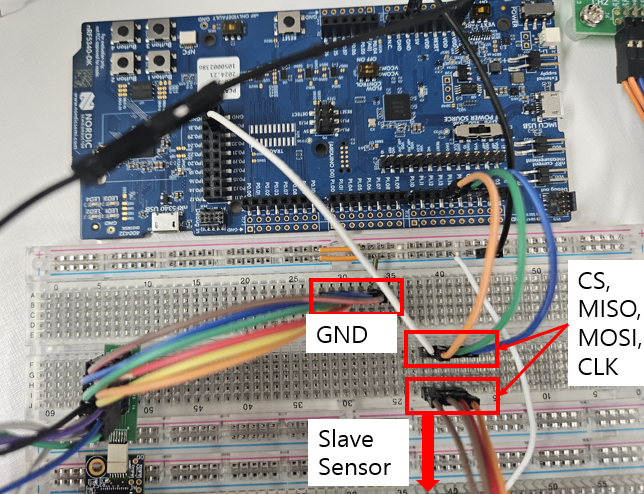
    How is the sensor connected? Is it possible to shorten the wires or solder the sensor directly onto the DK? Would you be able to share a photo of your setup? 

  • Apologies for the delayed response, which is due to the time difference (I'm based in Asia).


    Have you tried letting Zephyr automatically toggle the CS pin automatically, using spi_tranceive_dt? Does that make any difference? 

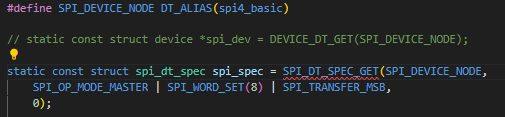
    I have already tried using spi_transceive_dt(), but I encountered an error when calling SPI_DT_SPEC_GET. As a result, I am using a struct spi_config instead.


    My problem is almost similar with this question: not able to get spi device tree specification using SPI_DT_SPEC_GET 

    Purpose of using spi_transceive_dt(), I use SPI_DT_SPEC_GET but the error returns: 

    identifier "__device_dts_ord_DT_N_S_soc_S_peripheral_40000000_S_spi_a000_BUS_ORD" is undefined

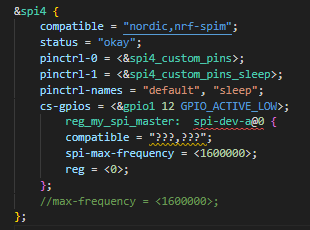
    This suggests the bus node is undefined. I tried to define it in my overlay file by referencing a lesson on the nRF5340's SPI.

    https://academy.nordicsemi.com/courses/nrf-connect-sdk-intermediate/lessons/lesson-5-serial-peripheral-interface-spi/topic/zephyr-spi-api/

    Even though I used the similar syntax as in the lesson's overlay file, I believe I can't properly define the bus node because I don't know the compatible string for my slave sensor (RHD2132, used for recording neural signals).

    Since there is no built-in Zephyr driver for the RHD2132, I need to write a custom one. However, creating the device tree bindings for it is proving to be complex. This is why I've fallen back to using spi_transceive() for now.

    How is the sensor connected? Is it possible to shorten the wires or solder the sensor directly onto the DK? Would you be able to share a photo of your setup?

     I have attached my current configuration for review: 

    The wires are currently long for testing, but the final design will be implemented on a PCB. We also plan to use LVDS in the future to improve signal integrity.

    Thanks to the help from Turbo J, there has been a significant improvement in the signal quality.

    Best regards,

    gwan0624

  • gwan0624 said:
    Since there is no built-in Zephyr driver for the RHD2132, I need to write a custom one.
    gwan0624 said:
    Even though I used the similar syntax as in the lesson's overlay file, I believe I can't properly define the bus node because I don't know the compatible string for my slave sensor (RHD2132, used for recording neural signals).

    You do not need a full Zephyr driver for your sensor to use the automatic CS handling. You only need a device tree node for your SPI slave with a unique compatible string (it can be vendor-specific, e.g., "myvendor,rhd2132")

    I will try to get back to you with more detailed instructions tomorrow. Some answers might be found in the SPI-lesson you referred to. 

Reply
  • gwan0624 said:
    Since there is no built-in Zephyr driver for the RHD2132, I need to write a custom one.
    gwan0624 said:
    Even though I used the similar syntax as in the lesson's overlay file, I believe I can't properly define the bus node because I don't know the compatible string for my slave sensor (RHD2132, used for recording neural signals).

    You do not need a full Zephyr driver for your sensor to use the automatic CS handling. You only need a device tree node for your SPI slave with a unique compatible string (it can be vendor-specific, e.g., "myvendor,rhd2132")

    I will try to get back to you with more detailed instructions tomorrow. Some answers might be found in the SPI-lesson you referred to. 

Children
  • Dear Helsing,

    Thank you very much for your help.

    It seems I'm currently having an issue with the device tree configuration.

    In fact, I was referencing the example code from the SPI-lesson I mentioned.

    lesson_codes

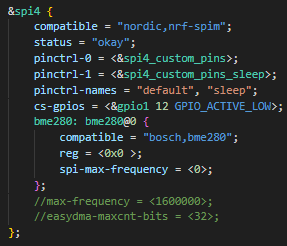
    Even though I referred to the overlay file's SPI node and the spi_struct in the main function from the nRF5340 example code, I am still unable to read a specific node from the device tree.

    (For purpose of practice, I use bosch,bme280)


    identifier "__device_dts_ord_DT_N_NODELABEL_bme280_BUS_ORD" is undefined

    From my experience, this issue appears to occur when I try to load a node that I have defined myself, rather than a built-in one. (For that reason, I am also using a pin originally registered as a button for the CS pin that will be controlled by GPIO.)

    I look forward to your assistance.

    Best regards,

    gwan0624

    P.S. There is an error on the community's lesson page. Some images are not displaying.


  • You are missing CONFIG_SENSORS=y, that should make the BME stuff work.

  • Dear gwan0624, sorry for the delay. 

    Did you try adding CONFIG_SENSORS=yes? Did that solve the issue? 

    Here is the missing image from the Devcademy lesson you mentioned. Is the page working now?


    Best regards, 

    Håkon

  • I apologize for the delayed feedback on Turbo J's response. I was on summer vacation.

    Did you try adding CONFIG_SENSORS=yes? Did that solve the issue? 

    First, the issue was not resolved even after using CONFIG_SENSOR=yes.

    I have already tried using spi_transceive_dt(), but I encountered an error when calling SPI_DT_SPEC_GET. As a result, I am using a struct spi_config instead.


    However, as you initially suggested, the problem might be that I am not controlling the SPI properly through the device tree. (Currently, I am unable to load the custom pins from the overlay file using DEVICE_DT_GET, so I am using the built-in LED or Button instead). Therefore, I plan to re-examine the device tree configuration.

    Additionally, the following post recommends using the IFTIMING.CSNDUR register, which I also plan to try: How to reduce spi chipselect to sclk delay 

    Here is the missing image from the Devcademy lesson you mentioned. Is the page working now?

    Lastly, There are still several missing images on 'Exercise1-Interfacing with a sensor over SPI' at Lesson5.

    Missing image's caption: 

    BME280 sensor
    Sensor breakout board
    BME280 register memory map
    BME280 compensation parameters' register addresses
    P0.28 to P0.31 are used as SPI pins for nRF5340 DK overlay
    P0.05, P0.06, P0.25 & P0.26 are used as SPI pins for nRF7002 DK overlay.

    Best regards, 

    gwan0624 

  • Hi gwan0624, 

    Sorry for the long delay, I will try to get back to you next week. Please let me know if you have any significant new findings.

    gwan0624 said:
    Lastly, There are still several missing images on 'Exercise1-Interfacing with a sensor over SPI' at Lesson5.

    Please see the attached PDF for this lesson. 

    Zephyr SPI API - Nordic Developer Academy.pdf

    Best regards,

    Håkon

Related