This post is older than 2 years and might not be relevant anymore
More Info: Consider searching for newer posts

Configuring UART_1 for nRF9160

Hi Dev Team,

I was working with the nRF9160 and started off with the basic UART sample found here : https://github.com/Rallare/fw-nrfconnect-nrf/tree/nrf9160_samples/samples/nrf9160/uart

I wanted to configure the UART_1 to connect to an external sensor, and I followed some links : https://devzone.nordicsemi.com/f/nordic-q-a/45476/connecting-uart1-to-a-periph-on-nrf9160-dk/178988#178988, https://devzone.nordicsemi.com/f/nordic-q-a/57199/using-the-nrf9160-to-send-and-receive-data-over-rs485-using-uart and changed the prj.conf file and the overlays file. 

prj.conf:

CONFIG_NEWLIB_LIBC=y
CONFIG_LIBLIGHTMODBUS=y


CONFIG_SERIAL=y
CONFIG_TRUSTED_EXECUTION_NONSECURE=y
CONFIG_UART_INTERRUPT_DRIVEN=y
CONFIG_MAIN_STACK_SIZE=4096

CONFIG_COMPILER_OPT="-DNRFX_UARTE_ENABLED=1 -DNRFX_UARTE0_ENABLED=1"


CONFIG_UART_1_NRF_UARTE=y

CONFIG_UART_1_NRF_FLOW_CONTROL=y

#CONFIG_BOARD_NRF9160DK_UART0_ARDUINO=y

#CONFIG_BOARD_NRF9160DK_UART0_VCOM=n

nrf9160dk_nrf9160ns.overlay:

/* Needed to get NRF_PWMn defined. */
&pwm1 {
	status = "okay";
};

&pwm2 {
	status = "okay";
};

&pwm3 {
	status = "okay";
};


&uart1 {
	current-speed = <9600>;
	status = "okay";
	tx-pin = <1>;
	rx-pin = <0>;
	rts-pin = <14>;
	cts-pin = <15>;
};

&uart0 {
	current-speed = <9600>;
	status = "ok";
	tx-pin = <10>;
	rx-pin = <11>;
	rts-pin = <12>;
	cts-pin = <13>;
};

The same is defined as an nrf9160dk_nrf9160.overlay file in the SPM folder.

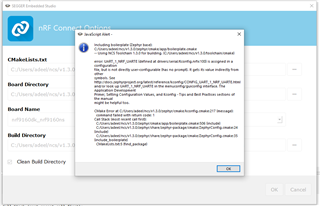
When I try to build my application, I get a Kconfig error regarding the CONFIG_UART_1_NRF_UARTE=y. Could you help me understand what more could be required to change for it to work for UART_0.
Regards,

Adeel.

Parents
  • In NCS v1.3.0 the configurations CONFIG_UART_<x>_NRF_UARTE are not directly user-configurable and you can not set them in the prj.conf file. These configurations will get their value from the Device Tree. E.g. if you have enabled uart1 in the overlay file (status="okay"), the configuration UART_1_NRF_UARTE will get enabled here.

    So in short, just removed CONFIG_UART_1_NRF_UARTE from prj.conf.

    Another thing to be aware of is that UART1 will automatically get routed to VCOM2 due to this. In order to avoid this, flash the nRF9160dk_nrf52840 (on the nRF9160DK) with a hello world sample with this configuration:

    BOARD_NRF9160DK_UART1_ARDUINO=y
    BOARD_NRF9160DK_UART1_VCOM=n

    Best regards,

    Simon

  • Hi Simon,

    Okay. I understood the first part.

    I try to flash the hello world example and I first switch the SW5 to nrf52. Then I add your configurations to the prj.conf file. But when I load the project, it again gives me KConfig errors here as well.

    This is when I try to build the hello world sample to flash for nRF9160dk_nrf52840. Is there something I am missing again.

    2287.board_controller_uart1.hex . I found this file from another post : https://devzone.nordicsemi.com/f/nordic-q-a/45476/connecting-uart1-to-a-periph-on-nrf9160-dk/178988#178988. Could I use this directly to flash the nRF9160dk_nrf52840 board ?

    Regards,

    Adeel.

  • Hi Simon,

    Thanks for the example. I was trying it out and I am trying to use UART_2 now.

    Do I need to also flash my nRF52840 board with : CONFIG_BOARD_NRF9160DK_UART2_ARDUINO=y
    CONFIG_BOARD_NRF9160DK_UART2_VCOM=n. I think its not necessary as I dint find this configuration anywhere but asking to make sure about it. 

    I was trying out the example but I am stuck in another error in the SPM file. 

    The log file is attached:

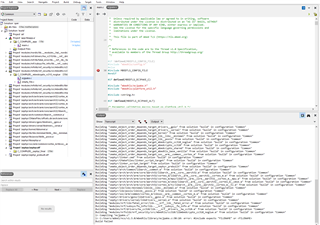
    Building ‘C:/Users/adeel/ncs/v1.3.0/zephyr/include/dt-bindings/gpio/gpio.h’ from solution ‘build’ in configuration ‘Common’
    Building ‘C:/Users/adeel/ncs/v1.3.0/zephyr/include/dt-bindings/i2c/i2c.h’ from solution ‘build’ in configuration ‘Common’
    Building ‘zephyr/misc/generated/subsystems.json’ from solution ‘build’ in configuration ‘Common’
    Building ‘zephyr/misc/generated/syscalls.json’ from solution ‘build’ in configuration ‘Common’
    Building ‘zephyr/CMakeFiles/parse_syscalls_target’ from solution ‘build’ in configuration ‘Common’
    Building ‘zephyr/parse_syscalls_target’ from solution ‘build’ in configuration ‘Common’
    Building ‘zephyr/include/generated/driver-validation.h’ from solution ‘build’ in configuration ‘Common’
    Building ‘zephyr/CMakeFiles/driver_validation_h_target’ from solution ‘build’ in configuration ‘Common’
    Building ‘zephyr/driver_validation_h_target’ from solution ‘build’ in configuration ‘Common’
    Building ‘zephyr/include/generated/kobj-types-enum.h’ from solution ‘build’ in configuration ‘Common’
    Building ‘zephyr/include/generated/otype-to-str.h’ from solution ‘build’ in configuration ‘Common’
    Building ‘zephyr/CMakeFiles/kobj_types_h_target’ from solution ‘build’ in configuration ‘Common’
    Building ‘zephyr/kobj_types_h_target’ from solution ‘build’ in configuration ‘Common’
    Building ‘zephyr/include/generated/syscall_list.h’ from solution ‘build’ in configuration ‘Common’
    Building ‘zephyr/CMakeFiles/syscall_list_h_target’ from solution ‘build’ in configuration ‘Common’
    Building ‘zephyr/include/generated/syscall_dispatch.c’ from solution ‘build’ in configuration ‘Common’
    Building ‘zephyr/syscall_list_h_target’ from solution ‘build’ in configuration ‘Common’
    Building ‘cmake_object_order_depends_target_offsets’ from solution ‘build’ in configuration ‘Common’
    Building ‘zephyr/CMakeFiles/offsets.dir/arch/arm/core/offsets/offsets.c.obj’ from solution ‘build’ in configuration ‘Common’
    Building ‘zephyr/offsets’ from solution ‘build’ in configuration ‘Common’
    Building ‘zephyr/include/generated/offsets.h’ from solution ‘build’ in configuration ‘Common’
    Building ‘zephyr/CMakeFiles/offsets_h’ from solution ‘build’ in configuration ‘Common’
    Building ‘zephyr/offsets_h’ from solution ‘build’ in configuration ‘Common’
    Building ‘zephyr/zephyr_generated_headers’ from solution ‘build’ in configuration ‘Common’
    Building ‘cmake_object_order_depends_target_app’ from solution ‘build’ in configuration ‘Common’
    Building ‘app/libapp.a’ from solution ‘build’ in configuration ‘Common’
    Building ‘cmake_object_order_depends_target_zephyr’ from solution ‘build’ in configuration ‘Common’
    Building ‘zephyr/libzephyr.a’ from solution ‘build’ in configuration ‘Common’
    Building ‘C:/Users/adeel/ncs/v1.3.0/zephyr/misc/empty_file.c’ from solution ‘build’ in configuration ‘Common’
    Building ‘cmake_object_order_depends_target_..__modules__hal__nordic’ from solution ‘build’ in configuration ‘Common’
    Building ‘cmake_object_order_depends_target_..__nrf__drivers__hw_cc310’ from solution ‘build’ in configuration ‘Common’
    Building ‘cmake_object_order_depends_target_..__nrf__lib__fatal_error’ from solution ‘build’ in configuration ‘Common’
    Building ‘cmake_object_order_depends_target_..__nrf__subsys__fw_info’ from solution ‘build’ in configuration ‘Common’
    Building ‘cmake_object_order_depends_target_arch__arm__core__aarch32’ from solution ‘build’ in configuration ‘Common’
    Building ‘cmake_object_order_depends_target_arch__arm__core__aarch32__cortex_m’ from solution ‘build’ in configuration ‘Common’
    Building ‘cmake_object_order_depends_target_arch__arm__core__aarch32__cortex_m__cmse’ from solution ‘build’ in configuration ‘Common’
    Building ‘cmake_object_order_depends_target_arch__arm__core__aarch32__cortex_m__mpu’ from solution ‘build’ in configuration ‘Common’
    Building ‘cmake_object_order_depends_target_arch__arm__core__aarch32__cortex_m__tz’ from solution ‘build’ in configuration ‘Common’
    Building ‘cmake_object_order_depends_target_arch__common’ from solution ‘build’ in configuration ‘Common’
    Building ‘cmake_object_order_depends_target_drivers__gpio’ from solution ‘build’ in configuration ‘Common’
    Building ‘cmake_object_order_depends_target_drivers__serial’ from solution ‘build’ in configuration ‘Common’
    Building ‘cmake_object_order_depends_target_kernel’ from solution ‘build’ in configuration ‘Common’
    Building ‘cmake_object_order_depends_target_lib__libc__minimal’ from solution ‘build’ in configuration ‘Common’
    Building ‘cmake_object_order_depends_target_lib__posix’ from solution ‘build’ in configuration ‘Common’
    Building ‘cmake_object_order_depends_target_mbedcrypto_cc310_noglue’ from solution ‘build’ in configuration ‘Common’
    Building ‘cmake_object_order_depends_target_mbedcrypto_cc310’ from solution ‘build’ in configuration ‘Common’
    Building ‘cmake_object_order_depends_target_mbedcrypto_shared’ from solution ‘build’ in configuration ‘Common’
    Building ‘cmake_object_order_depends_target_mbedtls_base_vanilla’ from solution ‘build’ in configuration ‘Common’
    Building ‘cmake_object_order_depends_target_soc__arm__common__cortex_m’ from solution ‘build’ in configuration ‘Common’
    Building ‘zephyr/linker.cmd’ from solution ‘build’ in configuration ‘Common’
    Building ‘zephyr/CMakeFiles/linker_script_target’ from solution ‘build’ in configuration ‘Common’
    Building ‘zephyr/linker_script_target’ from solution ‘build’ in configuration ‘Common’
    Building ‘cmake_object_order_depends_target_zephyr_prebuilt’ from solution ‘build’ in configuration ‘Common’
    Building ‘zephyr/arch/common/libarch__common.a’ from solution ‘build’ in configuration ‘Common’
    Building ‘zephyr/arch/arch/arm/core/aarch32/libarch__arm__core__aarch32.a’ from solution ‘build’ in configuration ‘Common’
    Building ‘zephyr/arch/arch/arm/core/aarch32/cortex_m/libarch__arm__core__aarch32__cortex_m.a’ from solution ‘build’ in configuration ‘Common’
    Building ‘zephyr/arch/arch/arm/core/aarch32/cortex_m/mpu/libarch__arm__core__aarch32__cortex_m__mpu.a’ from solution ‘build’ in configuration ‘Common’
    Building ‘zephyr/arch/arch/arm/core/aarch32/cortex_m/cmse/libarch__arm__core__aarch32__cortex_m__cmse.a’ from solution ‘build’ in configuration ‘Common’
    Building ‘zephyr/arch/arch/arm/core/aarch32/cortex_m/tz/libarch__arm__core__aarch32__cortex_m__tz.a’ from solution ‘build’ in configuration ‘Common’
    Building ‘zephyr/lib/libc/minimal/liblib__libc__minimal.a’ from solution ‘build’ in configuration ‘Common’
    Building ‘zephyr/lib/posix/liblib__posix.a’ from solution ‘build’ in configuration ‘Common’
    Building ‘zephyr/soc/arm/common/cortex_m/libsoc__arm__common__cortex_m.a’ from solution ‘build’ in configuration ‘Common’
    Building ‘zephyr/drivers/gpio/libdrivers__gpio.a’ from solution ‘build’ in configuration ‘Common’
    Building ‘zephyr/drivers/serial/libdrivers__serial.a’ from solution ‘build’ in configuration ‘Common’
    Building ‘modules/nrf/lib/fatal_error/lib..__nrf__lib__fatal_error.a’ from solution ‘build’ in configuration ‘Common’
    Building ‘modules/nrf/subsys/fw_info/lib..__nrf__subsys__fw_info.a’ from solution ‘build’ in configuration ‘Common’
    Building ‘modules/nrf/drivers/hw_cc310/lib..__nrf__drivers__hw_cc310.a’ from solution ‘build’ in configuration ‘Common’
    Building ‘modules/nrfxlib/nrf_security/src/mbedtls/cc310/libmbedcrypto_cc310_noglue.a’ from solution ‘build’ in configuration ‘Common’
    1> Compiling ‘ecjpake.c’
    1> C:/Users/adeel/ncs/v1.3.0/mbedtls/library/ecjpake.c:30:10: error: #include expects "FILENAME" or <FILENAME>
    Build failed
    
    How can I get rid of this error as this hampers my SPM file compiling now. I tried searching and found this post: https://devzone.nordicsemi.com/f/nordic-q-a/63888/there-is-a-bug-in-sdk-1-3-0-when-compile-the-mbedtls-under-the-path-of-modules-nrfxlib-nrf_security-src-mbedtls-i-get-the-following-error-mbedtls-library-chacha20-c-29-10-error-include-expects-filename-or but I did not understand what to do. Could you help me around in this fix as I think the SPM is an important configuration for external UART communication. 

    Regards,

    Adeel. 

  • Hi Simon,

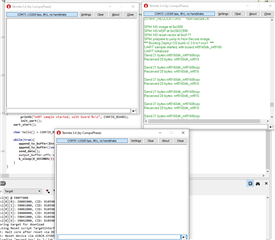
    I was able to run your example and I think the loopback works.

    I can see the send and receive at the same COM port. Just to start off sending data externally, I want to send an ASCII string externally and receive it on an external console. 

    4760.hello_world.zip

    I tried this example but the string "AT, Test" was not transmitted externally. Could you suggest me how to go about sending some strings externally to check the UART.

    Also, is my SPM build error hampering the functionality of external communication ? If so, how could I get rid of that.

    Regards,

    Adeel. 

  • I'm looking into this right now. Will test the sample.

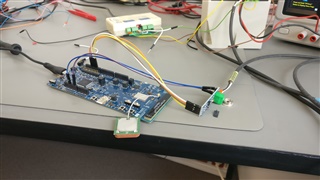
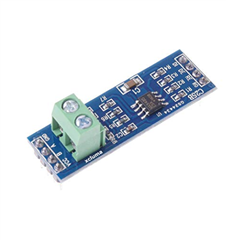
  • Okay, just an addition to it. I have my setup through a TTL_RS485 converter. 

    So, I assume my RTS-CTS (RE/DE) - (12,13) pins play a role in this. I tried setting the DE (12) to High before transmitting and made it low after the transmit is done and my CTS is set in receive mode thereafter.

    5148.hello_world.rar

    Attaching my updated code if you could have a look at this.

    I was looking for some working example for communication with RS-485 and nRF9160DK. I receive random values in my external console rather than my sent ASCII value.

    Not sure why is it like that. 

    Regards,

    Adeel.

  • I'm not too familiar with the RS485, but I tried to read up on it and gained some insight. Could you try the following connections:

    nRF9160 RS485
    5V RE
    5V DE
    TX DI
    5V Vcc
    GND (0V)

    GND

    Leave A and B as before.

    This will not use the flow control pins, and you will not be able to receive any data. But do this to see if you are able to transmit the data.

    Best regards

Reply
  • I'm not too familiar with the RS485, but I tried to read up on it and gained some insight. Could you try the following connections:

    nRF9160 RS485
    5V RE
    5V DE
    TX DI
    5V Vcc
    GND (0V)

    GND

    Leave A and B as before.

    This will not use the flow control pins, and you will not be able to receive any data. But do this to see if you are able to transmit the data.

    Best regards

Children
  • Hi Simon,

    It tried it but unfortunately it did not work :(.

    Right now, I have my RE connected to ground and DE (Pin 12) set as high to enable transmit. I read a blog post that explained it quite clearly: https://electronics.stackexchange.com/questions/153500/correctly-using-re-and-de-with-rs485/153508 

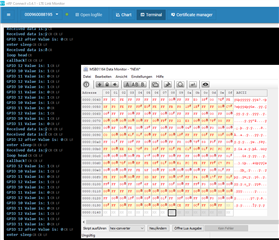
    I did it so as to check whether I am receiving what I am sending. With this, I get some random transmission on my console but I receive the same on my nRF terminal as Received data: (which is through my uart_buf).

    This happens when I move my DE pin a bit on pin 12 (Taking it out and putting it back in) :). That is when the data gets transmitted but it is random bits and not what I am sending. 

    I am a bit confused with the functionality.

    Regards,

    Adeel.

  • Hi Simon,

    I tried to follow this example to get an idea of how to work with RS-485 here.

    https://devzone.nordicsemi.com/f/nordic-q-a/55059/nrf51822-with-modbus-ttl-to-rs485

    I tried to configure the DE and RE as output through : nrf_gpio_cfg_output().

    Then, before sending the string, I set DE high as: nrf_gpio_pin_set().

    5355.hello_world.rar

    This is the example I am trying to modify. Can you just have a look to see if this is the right way to configure the DE/RE pins. Thanks for looking into this.

    Regards,

    Adeel.

  • Try to set RE high using nrf_gpio_pin_set() as well. As you can see here, setting RE high will disable the receiver (RE is LOW enable whle DE is high enable).

    Do you have a logic analyzer? Try attaching it to the lines to see what's actually going on.

    Best regards,

    Simon

  • Hi Simon,

    I did that as well. I tried to set both the pins (RE-DE) to high before transmission so that DE is enabled and RE is disabled. Then after the transmission, I tried to give a bit of a delay and then cleared both the pins to low so that DE is disabled and RE gets enabled. 

    I dont have a logic analyzer right now but will try to manage it. 

    Are there any examples of RS485 communication for nRF9160DK that I could refer to for more info.

    Regards,

    Adeel.

  • Hi Simon,

    As I understood from the RS-485 transmit and receive logic, I tried to implement it in the following way:

    #include <zephyr.h>
    #include <sys/printk.h>
    #include <zephyr.h>
    #include <string.h>
    #include <drivers/uart.h>
    #include "nrf.h"
    #include <hal/nrf_gpio.h>
    
    #include <drivers/gpio.h>
    
    #define GPIO_PORT "GPIO_0"
    
    #define RS485_TRANSMIT       1
    #define RS485_RECEIVE        0
    #define RS485_SWITCH_PIN1    10  // Tx
    #define RS485_SWITCH_PIN2    11  // Rx
    #define MAX485_DE      12    // DE pin (rts)
    #define MAX485_RE_NEG  13    // RE pin (cts)
    
    static u8_t uart_buf[1024];
    static struct device *uart_dev;
    
    
    void uart_cb(struct device *_uart)
    {
    	uart_irq_update(_uart); // Start processing interrupts in ISR.
    	int data_length = 0;
            
    
    	if (uart_irq_rx_ready(_uart)) { // Check if UART RX buffer has a received char.               
    		data_length = uart_fifo_read(_uart, uart_buf, sizeof(uart_buf)); // Read data from FIFO.
    		uart_buf[data_length] = 0;
                    }
                    printk("Received data is:%s\r\n", uart_buf); // Output received here
    
    }
    
    
    void uart_send_str(struct device *uart, char *str){
       
        printk("callback!\r\n");  
        
        nrf_gpio_pin_set(MAX485_DE);   // Setting it High before Tx
        nrf_gpio_pin_set(MAX485_RE_NEG);  // Setting it low before Tx
        u32_t len = strlen(str);
        while (len--) {
            uart_poll_out(uart, *str++); // Transmission
            //uart_fifo_fill(uart, str, 2);
    
        k_sleep(K_MSEC(5000));   // Delay 
        nrf_gpio_pin_clear(MAX485_DE);  // Setting low for reception
        nrf_gpio_pin_clear(MAX485_RE_NEG);  // Setting High for reception
        
        }
    }
    
    void main(void)
    {
            char *command = "OKAZZZ";      // String to be transmitted out
            printk("Hello, World!\r\n");
    
            uart_dev = device_get_binding("UART_2"); 
            if (!uart_dev) {
    		printk("error\r\n");
    	}          
    
            uart_irq_rx_disable(uart_dev);
            uart_irq_callback_set(uart_dev, uart_cb); // Set UART interrupt callback
            uart_irq_rx_enable(uart_dev);
    
            nrf_gpio_cfg_output(MAX485_DE); // Set DE as Output
            nrf_gpio_cfg_output(MAX485_RE_NEG); // Set RE as Output
    
    	while (1) {
                    printk("loop head\r\n");
                    uart_send_str(uart_dev, command); // Function to transmit the data
    	}
    }

    My overlay file is as follows: nrf9160dk_nrf9160ns.overlay

    &uart2 {
    	compatible = "nordic,nrf-uarte";
    	status = "okay";
    	current-speed = <115200>;
    	tx-pin = <10>;
    	rx-pin = <11>;
    	rts-pin = <12>;
    	cts-pin = <13>;
    	hw-flow-control;
    };
    
    &uart1 {
    	status = "disabled";
    };

    Could you look at the logic to see if this is the right way to enable / disable the DE/RE pins. The hardware connections are as per the overlay file.

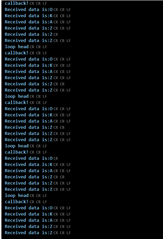
    The loopback works when I only connect Tx to Rx directly, so I guess the issue is only with the DE/RE pins. The loopback data is:

    I think I am close but just need some advice in enabling / disabling DE/RE pins in the code. Thanks for the help Slight smile.

    Regards,

    Adeel.

Related